
Table of Contents
 ▶
▶
- Relational Algebra in Hindi
- Types of Relational Algebra Operations in Hindi
- Basic Operations of Relational Algebra in Hindi
- Advanced Operations of Relational Algebra in Hindi
- Properties of Relational Algebra in Hindi
- Advantages of Relational Algebra in Hindi
- Disadvantages of Relational Algebra in Hindi
- FAQ
Relational Algebra in Hindi - relational algebra kya hai
Relational Algebra एक theoretical language है जिसका उपयोग relational databases पर operations perform करने के लिए किया जाता है।
यह SQL (Structured Query Language) का आधार है। इसमें mathematical set theory और logic का उपयोग होता है ताकि हम data को logically manipulate कर सकें।
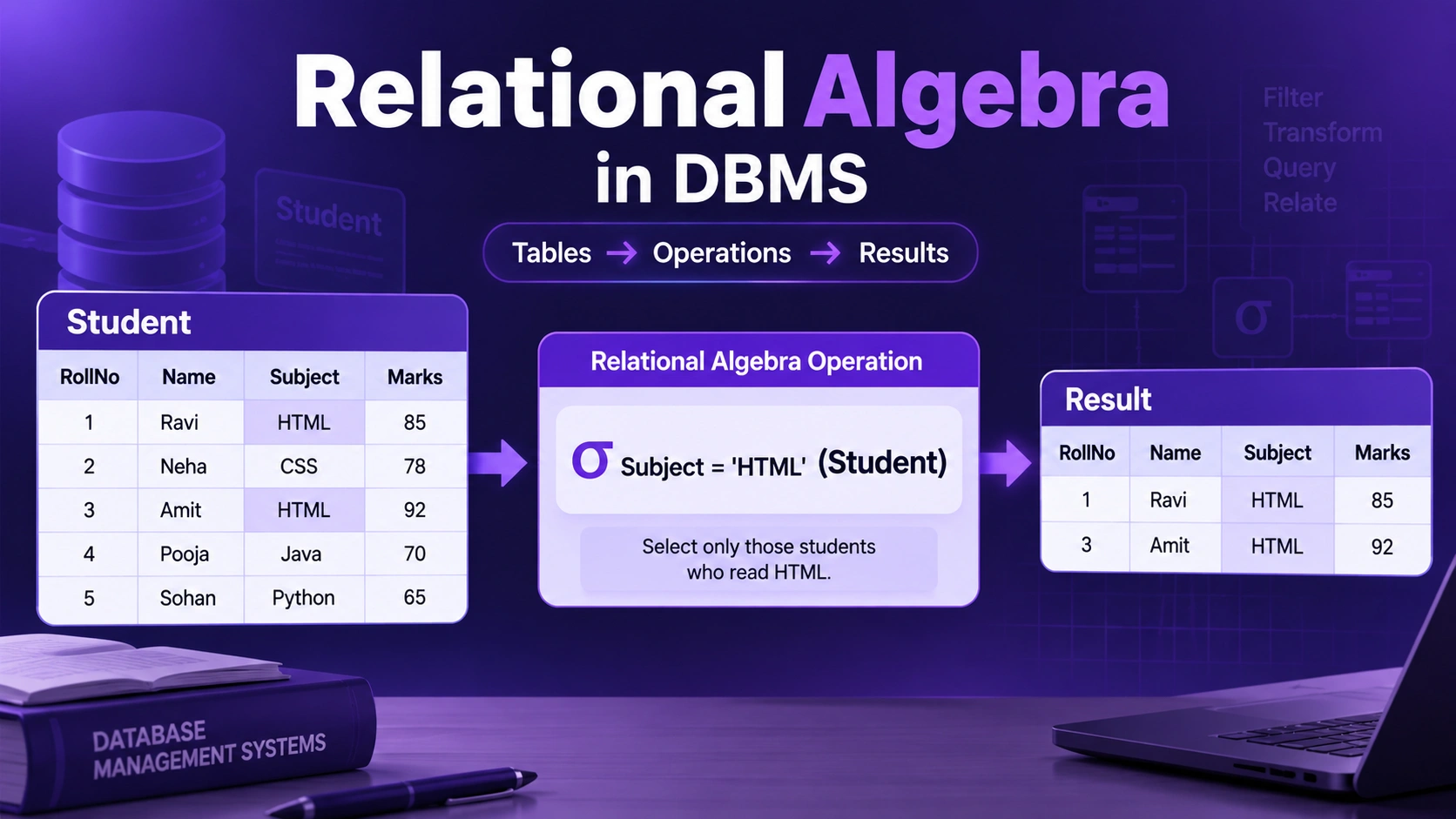
Relational Algebra = Database की tables पर operations लगाकर required data निकालने का तरीका।
यह एक procedural query language है, यानी इसमें हम बताते हैं कि data को कैसे प्राप्त किया जाए।
मान लो हमारे पास Student table है:
अगर हमें सिर्फ HTML पढ़ने वाले students चाहिए, तो Relational Algebra में:
σ Subject = 'HTML' (Student)
Types of Relational Algebra Operations in Hindi (Relational Algebra Operations के प्रकार क्या हैं?)

मुख्य रूप से Relational Algebra Operations को तीन प्रकारों में बांटा जाता है:
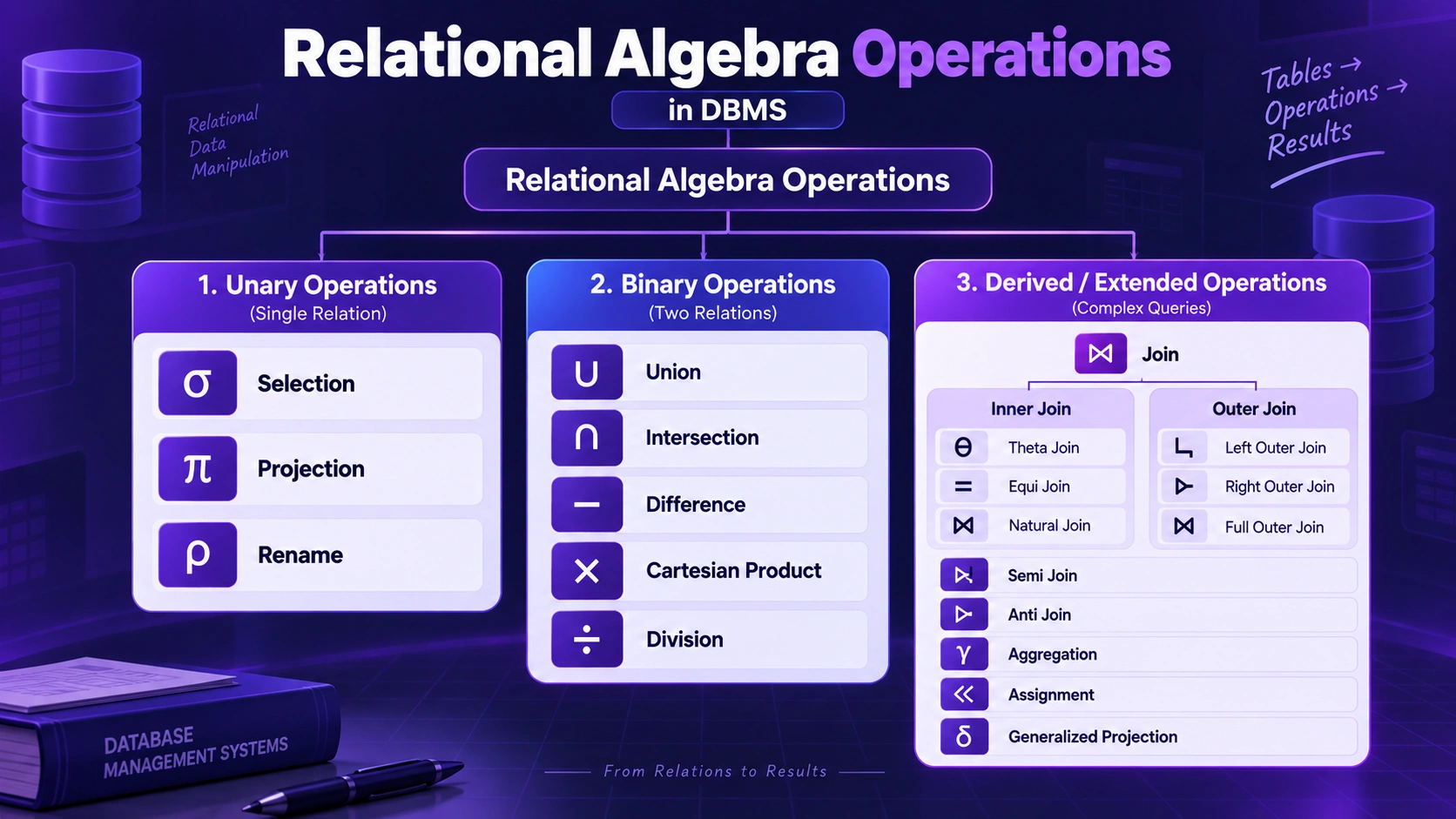
- Unary Operations
- Binary Operations
- Advanced Operations
अब हम इन सभी types को detail में समझते हैं।
i) Unary Operations in Hindi
Unary Operations वे operations होते हैं जो केवल एक relation (table) पर काम करते हैं।
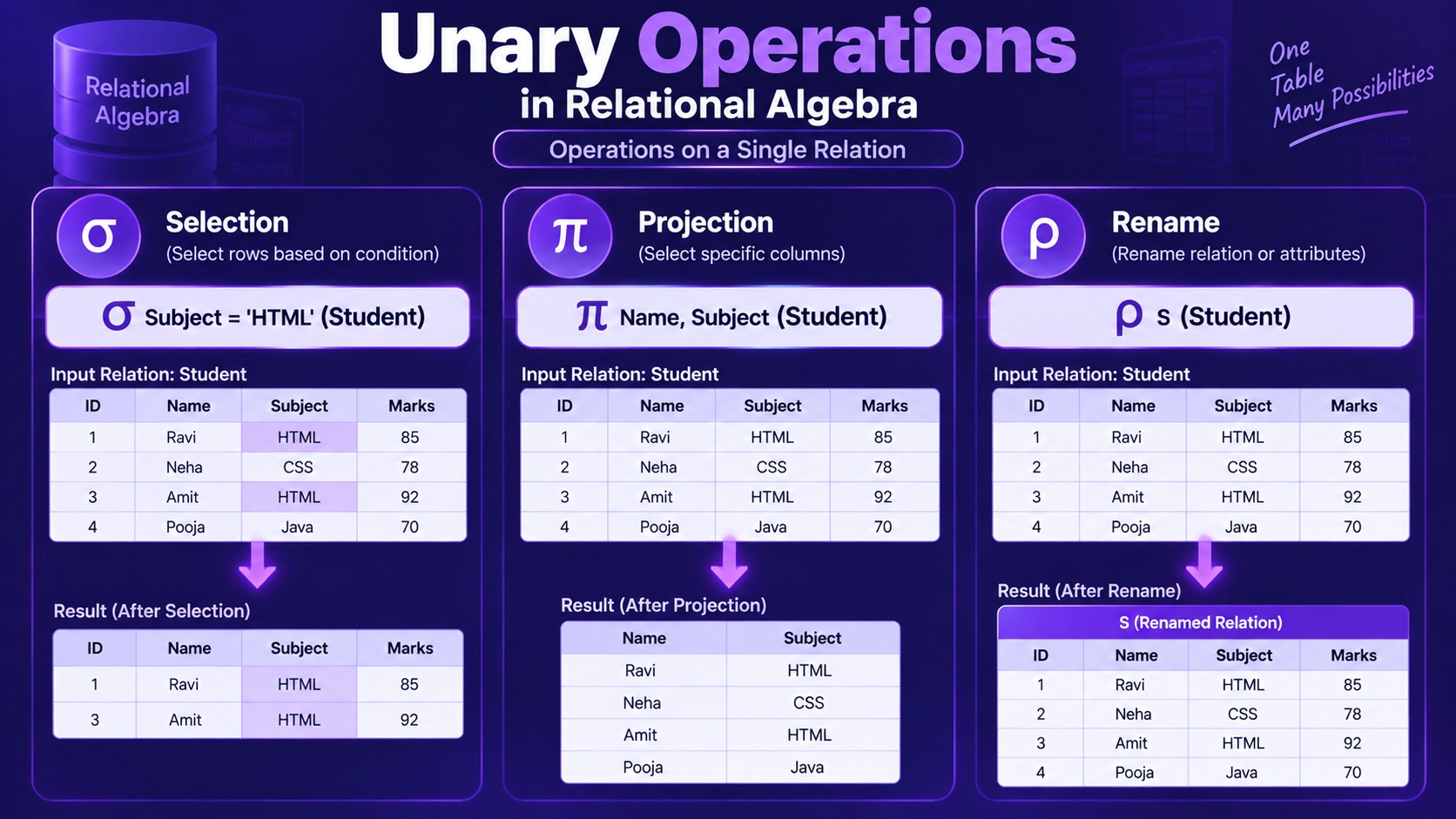
इनका मुख्य उद्देश्य data को filter करना, specific columns निकालना या relation का नाम बदलना होता है।
Unary Operations के प्रकार:
1. Selection (σ)
Selection operation का उपयोग relation से specific rows को चुनने के लिए किया जाता है जो किसी condition को satisfy करती हैं।
उदाहरण: σ salary > 50000 (Employee)
इसका मतलब है — Employee relation से वे सभी tuples निकालना जिनका salary 50000 से अधिक है।
2. Projection (π)
Projection का उपयोग relation की specific columns को select करने के लिए किया जाता है। यह duplicate rows को remove करता है।
उदाहरण: π name, department (Employee)
यह query केवल Employee relation के name और department columns को return करेगी।
3. Rename (ρ)
Rename operator का उपयोग relation या attribute का नाम बदलने के लिए किया जाता है। यह तब उपयोगी होता है जब हम multiple relations पर operation कर रहे हों जिनके attribute नाम समान हों।
उदाहरण: ρ Emp(E) — यह Employee relation का नाम Emp कर देगा।
ii) Binary Operations in Hindi
Binary Operations वे operations होते हैं जो दो relations पर काम करते हैं।
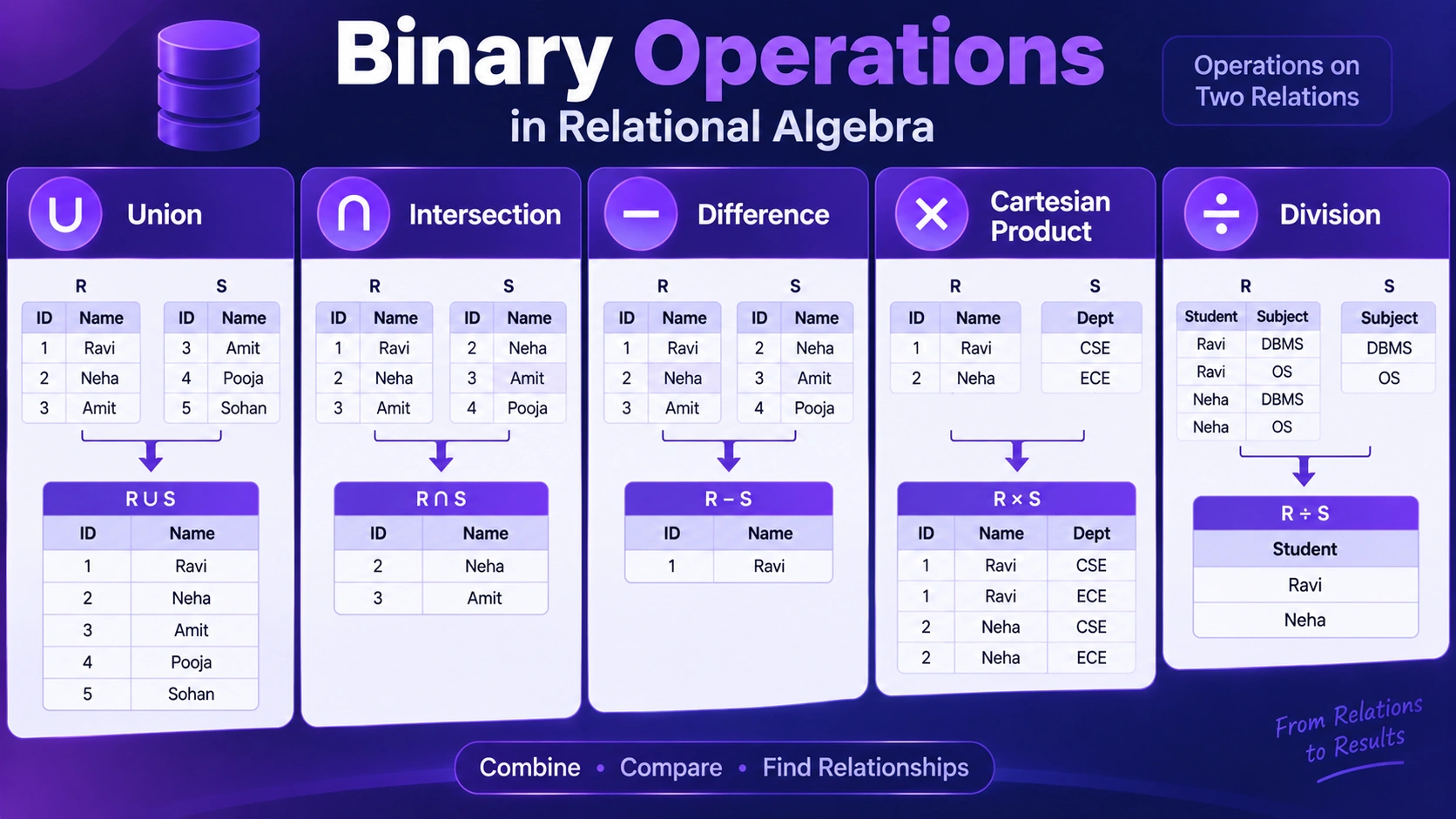
इनका उपयोग data को combine करने, compare करने और relations के बीच संबंध बनाने के लिए किया जाता है।
Binary Operations के प्रकार:
1. Union (∪)
Union operation दो relations के tuples को combine करता है और duplicates को हटा देता है। दोनों relations का structure समान होना चाहिए।
उदाहरण: Employee ∪ Manager
यह दोनों relations के common और unique tuples को एक साथ return करेगा।
2. Intersection (∩)
Intersection operation उन tuples को return करता है जो दोनों relations में common होते हैं।
उदाहरण: Employee ∩ Manager
यह केवल वे tuples return करेगा जो Employee और Manager दोनों में मौजूद हैं।
3. Difference (−)
Difference operation पहले relation के वे tuples return करता है जो दूसरे relation में नहीं हैं। यह subtraction की तरह काम करता है।
उदाहरण: Employee − Manager
यह वे employees दिखाएगा जो managers नहीं हैं।
4. Cartesian Product (×)
Cartesian Product operation दो relations के प्रत्येक tuple को एक-दूसरे के साथ combine करता है। यह large dataset बनाता है और आगे join operations के लिए उपयोगी होता है।
उदाहरण: Employee × Department
iii) Advanced Operations
Advanced Operations का उपयोग complex queries को solve करने के लिए किया जाता है। ये basic और binary operations का combination होते हैं।
Advanced Operations (Derived / Extended Operations) के प्रकार:
1. Join (⨝)
Join एक महत्वपूर्ण binary operation है, जिसका उपयोग दो related relations को किसी common attribute या condition के आधार पर combine करने के लिए किया जाता है।
Join को मुख्य रूप से निम्न प्रकारों में समझा जाता है:
Join Operations
-
Inner Join
- Theta Join
- Equi Join
- Natural Join
-
Outer Join
- Left Outer Join
- Right Outer Join
- Full Outer Join
-
Cross Join / Cartesian Join
- Cartesian Product Join
-
Self Join
- Self Join
-
Semi Join
- Left Semi Join
- Right Semi Join
-
Anti Join
- Left Anti Join
- Right Anti Join
A. Inner Join
Inner Join का मतलब है कि हमें केवल वही records चाहिए जिनका दोनों tables में आपस में match मिलता है।
आसान उदाहरण: मान लीजिए हमारे पास दो tables हैं —
Student और Department।
Student table में student का Dept_ID दिया है और Department
table में उसी Dept_ID के साथ department का नाम दिया है।
अगर दोनों tables में Dept_ID match करता है, तभी वह record
result में आएगा।
यानी आसान भाषा में: "जहाँ दोनों tables में match है, वही record दिखाओ।"
1. Theta Join (⋈θ)
Theta Join में दो tables को किसी condition के आधार पर जोड़ा जाता है।
यह condition केवल = नहीं होती, बल्कि
<, >, ≤, ≥
जैसी conditions भी हो सकती हैं।
आसान उदाहरण: मान लीजिए Student table में students के
marks हैं और एक दूसरी table में passing marks दिए गए हैं।
अगर हम condition लगाते हैं:
Student.Marks >= PassingMarks.Marks
तो जिन students के marks passing marks से ज्यादा या बराबर हैं,
उनका match मिलेगा।
यानी Theta Join में हम पूछ सकते हैं: "क्या यह value दूसरी value से बड़ी, छोटी, बराबर आदि है?"
2. Equi Join
Equi Join, Theta Join का ही एक special type है। इसमें केवल equal (=) condition का उपयोग किया जाता है।
आसान उदाहरण: Student table में:
- Student_ID
- Name
- Dept_ID
और Department table में:
- Dept_ID
- Dept_Name
अगर हम condition लगाते हैं:
Student.Dept_ID = Department.Dept_ID
तो यह Equi Join है।
उदाहरण के लिए Student का Dept_ID = 10 है और Department
table में भी Dept_ID = 10 है, तो दोनों records आपस में
जुड़ जाएंगे।
यानी आसान भाषा में: "दोनों tables में value बराबर है तो जोड़ दो।"
3. Natural Join (⋈)
Natural Join भी matching values के आधार पर tables को जोड़ता है। लेकिन इसमें हमें join condition अलग से लिखने की जरूरत नहीं होती। यह दोनों tables में मौजूद same-name वाले common attribute को देखकर automatically join करता है।
आसान उदाहरण: Student और Department दोनों tables में
Dept_ID नाम का column है।
Natural Join automatically Dept_ID को देखकर दोनों tables
को जोड़ देगा।
अगर दोनों tables में Dept_ID = 10 है, तो दोनों records
आपस में जुड़ जाएंगे।
एक और खास बात: Dept_ID दोनों tables में होने के बावजूद
result में इसे सामान्यतः एक ही बार दिखाया जाता है।
यानी आसान भाषा में: "Same नाम का common column ढूंढो और उसके आधार पर automatically जोड़ दो।"
B. Outer Join
Outer Join में केवल matching records ही नहीं, बल्कि कुछ non-matching records भी शामिल किए जाते हैं।
इसे ऐसे समझें: Inner Join कहता है "जिसका match है सिर्फ वही दिखाओ", जबकि Outer Join कहता है "जिसका match नहीं है, उसे भी मत छोड़ो।"
Student और Department के example में अगर किसी student का department
नहीं मिलता, तो Outer Join उस student को भी result में रख सकता है।
जहाँ department की जानकारी नहीं मिलेगी, वहाँ NULL दिखाई देगा।
1. Left Outer Join (⟕)
Left Outer Join में left table के सभी records आते हैं। Right table से केवल matching records आते हैं।
आसान उदाहरण: मान लीजिए Student table में 5 students हैं, लेकिन उनमें से केवल 4 students का Department table में department मिलता है।
Left Outer Join करने पर सभी 5 students result में आएंगे।
जिस student का department नहीं मिला, उसके department की जानकारी
NULL होगी।
यानी याद रखें: Left = Left table का कोई record नहीं छूटेगा।
2. Right Outer Join (⟖)
Right Outer Join में right table के सभी records आते हैं। Left table से केवल matching records आते हैं।
आसान उदाहरण: मान लीजिए Department table में 5 departments हैं, लेकिन किसी एक department में अभी कोई student नहीं है।
Right Outer Join करने पर सभी 5 departments result में
आएंगे। जिस department का कोई student नहीं है, वहाँ student की
information NULL होगी।
यानी याद रखें: Right = Right table का कोई record नहीं छूटेगा।
3. Full Outer Join (⟗)
Full Outer Join में दोनों tables के सभी records रखे जाते हैं। चाहे उनका match मिले या न मिले।
आसान उदाहरण: Student table में 5 students हैं और Department table में 5 departments हैं। कुछ students का department नहीं मिलता और कुछ departments में कोई student नहीं है।
Full Outer Join में सभी students और सभी departments
result में आएंगे।
जहाँ match नहीं मिलेगा, वहाँ दूसरी table की information
NULL होगी।
यानी याद रखें: Full = दोनों tables का कोई record नहीं छूटेगा।
C. Other Join Types
1. Semi Join (⋉ / ⋊)
Semi Join में पहली table के केवल वही records मिलते हैं जिनका दूसरी table में match मौजूद है। लेकिन दूसरी table की पूरी information result में नहीं लाई जाती।
आसान उदाहरण: मान लीजिए Student table में 10 students हैं। Department table में केवल 7 students के valid department IDs मौजूद हैं।
Semi Join हमें केवल उन 7 students को बताएगा जिनका department मौजूद है।
लेकिन Department table की पूरी details जैसे Dept_Name
result में लाना जरूरी नहीं है।
यानी आसान भाषा में: "मुझे सिर्फ यह पता करना है कि इसका दूसरी table में match है या नहीं।"
2. Anti Join
Anti Join, Semi Join का उल्टा समझ सकते हैं। इसमें केवल वे records मिलते हैं जिनका दूसरी table में कोई match नहीं है।
आसान उदाहरण: Student table में 10 students हैं, लेकिन Department table में केवल 8 students के department records हैं।
Anti Join उन 2 students को दिखाएगा जिनका Department table में कोई matching record नहीं मिला।
यानी आसान भाषा में: "जिसका दूसरी table में match नहीं है, सिर्फ वही दिखाओ।"
4. Other Extended Operations
Extended Relational Algebra में basic operations के अलावा कुछ additional operations भी उपयोग किए जाते हैं, जो data को calculate, group या temporarily store करने में मदद करते हैं।
1. Aggregation / Grouping (γ)
Aggregation या Grouping operation का उपयोग data को group करने और
COUNT, SUM, AVG,
MIN और MAX जैसे calculations करने के लिए किया
जाता है।
Easy Example: यदि Student table में students के marks
दिए गए हैं, तो department के अनुसार students की संख्या निकालने के लिए
Grouping और COUNT का उपयोग किया जा सकता है।
2. Generalized Projection
Generalized Projection, सामान्य Projection का extended form है। इसमें attributes को select करने के साथ-साथ mathematical expressions या calculations भी किए जा सकते हैं।
Easy Example: यदि Student relation में
Marks attribute है, तो Marks + 5 calculate करके
नया result प्राप्त किया जा सकता है।
3. Assignment (←)
Assignment operation का उपयोग किसी relational algebra expression के
result को एक temporary relation में store करने के लिए किया जाता है।
इसका symbol ← है।
Easy Example: यदि किसी operation का result
R नाम की temporary relation में store करना हो, तो
R ← σMarks > 50(Student) लिखा जा सकता है।
इसका अर्थ है कि 50 से अधिक marks वाले students का result
R में store किया गया है।
2. Division (÷)
Division operation का उपयोग उन tuples को खोजने के लिए किया जाता है जो किसी दूसरे relation के सभी tuples से संबंधित होते हैं।
उदाहरण: यदि हमें उन students को खोजना है जिन्होंने सभी subjects पास किए हैं, तो division operator का उपयोग किया जाता है।
Aggregation Operations
Aggregation operations का उपयोग data पर calculations करने के लिए किया जाता है जैसे Count, Sum, Average आदि।
Properties of Relational Algebra in Hindi
- Closure Property: Result भी relation होता है
- Set-Oriented: Operations sets पर काम करते हैं
- No Duplicate Rows: Duplicate rows allow नहीं होती
- Procedural Language: Steps define करने होते हैं
Advantages of Relational Algebra in Hindi
- Clear Query Logic: Query process स्पष्ट होता है।
- Mathematical Foundation: Strong theoretical base होता है।
- Query Optimization: Queries को optimize करने में मदद करता है।
- Foundation of SQL: SQL इसी पर आधारित है।
- Flexible Operations: Complex queries आसानी से handle होती हैं।
Disadvantages of Relational Algebra in Hindi
- Complex Syntax: समझना थोड़ा कठिन हो सकता है।
- Not User-Friendly: Direct use practical systems में कम होता है।
- Procedural Nature: User को steps define करने पड़ते हैं।
- Limited Practical Use: Mainly theoretical concept है।